An online menu with QR code, for every table and every chat
Ispley turns your menu into an online menu with QR code: every dish and drink with its photo and price, opened from the code on the table or the link on your Facebook page. Change a price once, and every code you printed shows the new one.
Plans from ₱99 a month. No card needed to sign up.
See it on a real page.
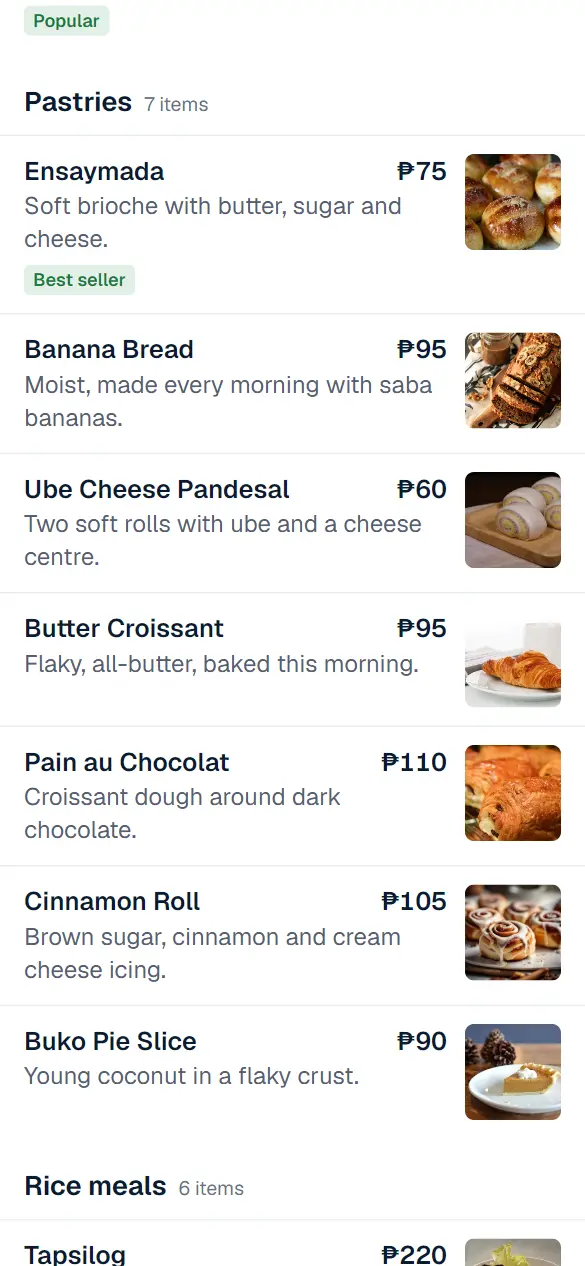
This is a demo café made with Ispley. Open it on your phone and tap around the way your customers would.
What you get
-
A QR code that never goes out of date
Your QR code opens your live menu, not a photo of last year’s price list or a PDF nobody can zoom. When a dish goes up by ten pesos or a new drink comes in, you edit the menu and the same code shows it. Mark an item sold out for the rest of the day, and customers stop asking for it.
-
A digital menu people can actually read
Sections like Breakfast, Rice meals and Drinks keep a long menu easy to scan on a small screen, and customers can search it. A dish can have sizes or add-ons with their own prices, a tag such as Best seller or New, and a photo that makes people hungry before the food arrives.
-
The same menu link for your Facebook page
Put the link in your page’s details, your pinned post and your saved replies. A customer who asks “menu po?” gets the whole menu in one tap, and when they are ready they message you on Messenger, Viber or WhatsApp, or call. You take the order the way you already do.
-
QR cards for your tables and counter
Ispley makes the print pieces from your menu: a QR card for tables and the counter, item cards for your specials and a tarpaulin for the front of your place, with your logo and colors. On Business, the same menu can also play on a TV behind the counter. Online or in the store, customers read one menu.
How it works
-
Step 1
Sign up
Make your account and name your business. It takes a few minutes.
-
Step 2
Add your items
Upload your photos, type your prices and put them in sections.
-
Step 3
Share your link or QR
Post your link, put it in your bio and replies, or print your QR code.
Made for what you sell
- Carinderias and turo-turo with a menu that changes every day.
- Restaurants that want a QR menu on each table instead of laminated menus that get sticky.
- Cafés and milk tea shops with sizes, sinkers and add-ons.
- Food stalls and kiosks in malls and bazaars, where the line moves faster when people read ahead.
- Home and cloud kitchens that take their orders by Messenger.
- Grill houses and bars with one list for food and another for drinks and pulutan.
What it costs
-
Lite
₱99 a month
For a home or face-to-face seller.
-
Starter
₱299 a month
For a stall or small shop that’s growing.
-
Business
₱549 a month
For a café, boutique or salon with staff.
Ask for a 14-day free trial after you sign up. See every plan and what it includes
Questions about QR menus
Something else? Write to us at support@ispley.com.
How does a QR menu work for my customers?
They point the phone camera at the code and your menu opens in the browser. There is no app, no sign-up and nothing to download. It works on any phone with a camera and mobile data or Wi-Fi.
Do I need to reprint the QR code when the menu changes?
No. The code opens your page, so new dishes, prices and photos show up on the same code. Reprint only a piece that has a price printed on it, like an item card.
Can customers order from the digital menu?
Not on the page itself. They read the menu, then tap a button to message you or call, and you take the order at the counter or in the chat as you do now. Payment stays between you and your customer.
Can I hide a dish that is not available today?
Yes. Mark it sold out and it stays on the menu with a sold out label, or hide it until it is back. Either one takes a few taps on your phone, even in the middle of lunch.
How do I put the menu link on my Facebook page?
Copy your link from your account and paste it into your page’s details, a pinned post and your saved Messenger replies. The link and the QR code on your tables open the same menu.
More from Ispley
Put your business in view.
Plans from ₱99 a month. Ask for a 14-day free trial after you sign up.