QR menu vs printed menu: which is right for your store?
The QR menu vs printed menu choice is easier than it looks. Paper is simple and always there, and a QR menu is the one you can change in a minute. Ispley gives you the QR menu and prints cards for your tables, so you can keep a bit of both.
Plans from ₱99 a month. No card needed to sign up.
See it on a real page.
This is a demo café made with Ispley. Open it on your phone and tap around the way your customers would.
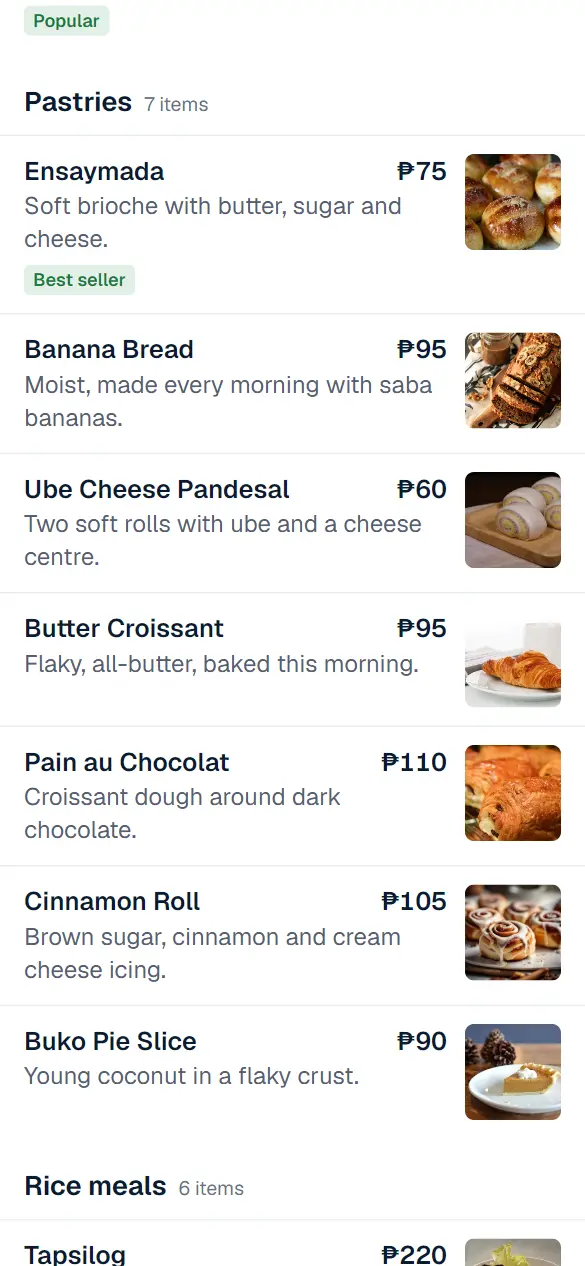
Ispley and a printed menu, side by side
| What you compare | Ispley | A printed menu |
|---|---|---|
| Updating a price | Edit it on your phone and the page shows it right away. | Correct it by hand, put a sticker on it, or reprint the menu. |
| Sold out items | Mark an item sold out in a tap and the menu shows a sold out label. | Cross it out, or tell each customer when they order. |
| Photos | A photo for every item, with sizes and add-ons beside it. | Photos are possible but cost more to print, and every change means a new print. |
| Cost of reprinting | None for the page. Only a piece with a price printed on it, like an item card, needs a reprint. | A new print run each time prices or dishes change. |
| Works with no phone or signal | The customer needs a phone and mobile data or Wi-Fi to open the page. | Always works. No phone, no battery and no signal needed. |
| Customers who prefer paper | Your table cards give them a card to hold, but the menu itself opens on a phone. | Some customers like to hold a menu and read it, and paper suits them. |
What you get
-
Change a price in a minute
A printed menu shows the prices of the day it was printed. When flour or milk goes up, you correct it with a pen or a sticker, or you pay for a reprint. With your Ispley menu you edit the price on your phone, and the page behind your QR code shows it right away.
-
Sold out labels, photos and sections
Mark an item sold out and the menu shows a sold out label, so customers stop asking for what you ran out of. Each item can have a photo, a short line, sizes and add-ons, and sections keep a long list easy to scan. A laminated sheet cannot do that without crossing things out.
-
Table cards of your own
Ispley makes printable pieces from your menu: a QR card for tables and the counter, item cards for your specials and a tarpaulin for the front of your place, with your logo and colors. A customer who likes paper still has a card to hold, and the code on it opens the current menu. The same menu is seen online, from the link on your Facebook page, and in the store, from the card on the table.
-
When paper is the better choice
A printed menu needs no phone, no battery and no signal, and some customers, like an older regular, simply prefer it. If the signal in your area is weak, keep a few paper copies at the counter beside your QR card. The two work well together.
How it works
-
Step 1
Sign up
Make your account and name your business. It takes a few minutes.
-
Step 2
Add your items
Upload your photos, type your prices and put them in sections.
-
Step 3
Share your link or QR
Post your link, put it in your bio and replies, or print your QR code.
Which one suits your place
- Carinderias and turo-turo whose dishes and prices change every day.
- Cafés and milk tea shops tired of sticky laminated menus.
- Food stalls and kiosks where the line moves faster when people read ahead.
- Restaurants that keep a few paper copies for guests who ask for one.
- Home and cloud kitchens that send one menu link to every customer.
- Bars and grill houses with a separate list for drinks and pulutan.
What it costs
-
Lite
₱99 a month
For a home or face-to-face seller.
-
Starter
₱299 a month
For a stall or small shop that’s growing.
-
Business
₱549 a month
For a café, boutique or salon with staff.
Ask for a 14-day free trial after you sign up. See every plan and what it includes
Questions about QR and paper menus
Something else? Write to us at support@ispley.com.
Is a QR menu better than a printed menu?
It depends on your place. A QR menu is better for changing prices, showing photos and marking sold out items. A printed menu is better when a customer has no phone or no signal, or simply likes paper. You can keep both.
Do customers need an app to open a QR menu?
No app and no account. The phone camera reads the code and your menu opens in the browser.
What if a customer has no phone or no signal?
Then paper is the safer choice, so keep a printed copy or two at the counter. Your menu page needs mobile data or Wi-Fi to open, while paper always works.
How often do I reprint with a QR menu?
Only the pieces with a price printed on them, such as an item card. The QR code on your table card opens your live page, so new dishes and new prices show up without a reprint.
Can customers order from the QR menu?
Not on the page. They read the menu, then message you on Messenger, Viber or WhatsApp, call, or tell the staff, and you take the order as you do now.
Does a QR menu cost more than printing?
A printed menu costs a little each time you reprint, and Ispley has a monthly plan, so the saving depends on how often your dishes and prices change. The pricing page lists the plans.
More from Ispley
Put your business in view.
Plans from ₱99 a month. Ask for a 14-day free trial after you sign up.